
Laser Cutting File Submission Guide
How to prepare and submit your pattern files so we can cut your first run right, the first time.
Questions, or ready to send a file? Email us at info@stitchtechnologies.com.
Follow the six steps below when you submit a job. If anything is missing or doesn't meet spec, we'll have to send your file back before we can schedule the cut.
1.Download Template
2.Nest within the bed size and your fabric width
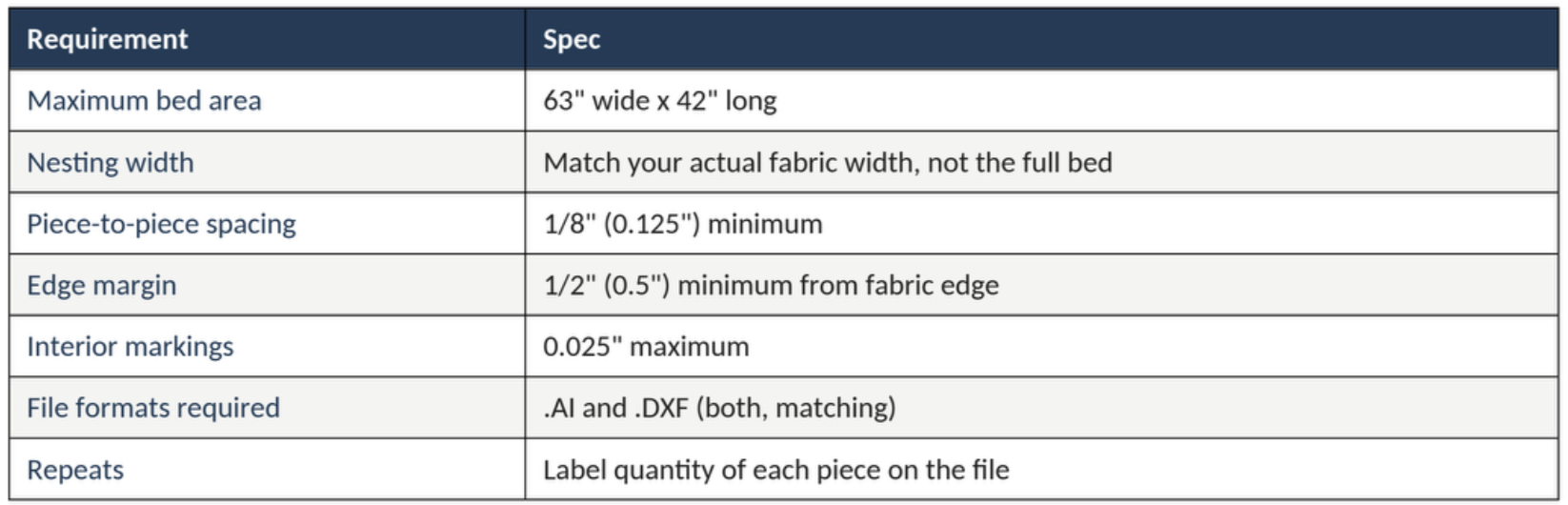
Maximum cutting area: 63" wide x 42" long.
Nest your pieces within the width of fabric you're actually supplying. If your fabric is narrower than 63" (e.g. 58"), keep every piece inside that 58", not the full bed.
Art board cannot exceed 225” x 225”. May need to send multiple files if pattern cannot fit within those dimensions.
3.Leave the required spacing
At least 1/8" (0.125") between every pair of pieces.
At least 1/2" (0.5") between any piece and the outer edge of the fabric.
See the diagram below: detail A shows the edge margin, detail B shows piece-to-piece spacing.
4.Keep interior markings small
Any interior reference marks inside a piece (alignment dots, fold lines, drill points) must be 0.025" or smaller. Anything larger will be treated as a cut line instead of a mark.
5.Tell us about repeats
If a piece repeats within the layout, label exactly how many of each you need, for example "Panel A x4, Panel B x2."
Label every unique piece by name directly on the layout.
6.Submit both file formats
Every job needs two files of the same finished layout:
.AI (Adobe Illustrator)
.DXF (CAD/vector exchange format)
Quotes include $40 Set up fee. This includes up to 3 colors or types of fabrics. Any additional Color/Fabric type is $10 each.